
Marketing Teams
Marketing teams see the biggest picture. You know which campaigns are live, which audiences they're working, how a stranger becomes a lead and when a lead is ready for sales. The teams around you rarely see any of it. Your strategy lives in a plan, a deck and a dozen campaign dashboards, while sales and service work from the records in front of them.
Flows put your picture where everyone works. Your lifecycle, the campaigns that feed it and the messaging you want repeated sit on the HubSpot records sales and service already open, current as of the last time you changed them.
How Flows help marketing teams
The lifecycle, explained. Everyone sees a contact's lifecycle stage. Few people know what moved it there. A Flow shows the HubSpot settings, workflows and lead scoring behind every stage change, so nobody builds a workflow that fights the one you already have.
Campaigns where the process uses them. A Campaign card puts a HubSpot campaign on the part of the process it feeds, so the whole organization can see what's bringing people in, and where.
A clean handoff to sales. The point where marketing hands a lead to sales is where most misalignment starts. Mapping the criteria and the routing, with a Decision for "Marketing-qualified?", gives both teams one definition to argue about, instead of two.
Your messaging on the record. Flow Cards put the current campaign, the approved talking points and this quarter's priorities on every deal and contact, so a rep's pitch matches what the buyer has already seen from you.
Flows for marketing teams
These Flow Library patterns are the best place for a marketing team to start. Each one is built out for Hooby Snacks, so you can see it working, then copy it into your own portal and make it yours.
Your lifecycle
The contact and company lifecycles are marketing's map. The Lifecycle Flow shows every stage, from a new subscriber through to customer, with the HubSpot settings that set them, the workflow that owns each stage change, and a Child Flow for the work behind each stage. Its example walks through capturing a new contact, scoring them to MQL, deciding whether they're marketing-qualified, and routing the new lead to sales, which is the part of the lifecycle marketing owns.
Map your Contact & Company lifecycle stages, and pin the HubSpot settings that move people through them—defaults on create, lead & deal sync, and stage automation—so everyone can see how HubSpot is wired. Put the Flow directly in view on your HubSpot records.
Put the Lifecycle Flow on your contact and company records. When a rep asks why a contact is still a lead, or a manager asks why MQLs dropped this month, the answer is one click away.
Your campaigns, on the Flow
A Campaign card is the most useful accessory a marketing team has. It brings the campaign from HubSpot onto the exact Step, Start or Data element where that campaign does its work, like the Start of the Flow a form submission begins, or the nurture Step that works new leads. In the Lifecycle Flow example, Fall Flavors Launch sits on the Start of Capture a New Contact, because its newsletter signup form is what starts that Flow.
The card shows the campaign's status, dates and audience, the assets it includes, from marketing emails and landing pages to forms, workflows, ads and social posts, and its budget and spend. Anyone can open the campaign or any of its assets in HubSpot straight from the card. That changes what each team gets out of your work:
- Sales and service can see which campaign brings records in at each point, and open its emails and landing pages to see exactly what the buyer was shown.
- Leadership can see the whole funnel and the campaigns behind each part of it in one place, with budget and spend beside them.
- Your own team can see where campaigns are missing. Plan a campaign on the Flow before it exists in HubSpot, and the card shows "Not in HubSpot yet" until you link it.
Whoever builds the Flow chooses which sections each card shows, so a card on a nurture Step can show just the campaign's status and what it includes, while one on a launch Flow shows everything.

For how to read a Campaign card section by section, jump to Campaign. To add one, jump to
Editing Campaign Cards
.
Breeze AI in your marketing process
Breeze is built into most of marketing's work in HubSpot. Its content agent drafts blog posts, landing pages and case studies in your brand voice, which it learns from samples you give it. Breeze Assistant helps with the groundwork, like defining your ideal customers and writing campaign briefs, using your CRM records and campaign results. And because the drafts can drift toward generic, every team that uses it well has a step where a person edits before anything is published.
Every marketer finds their own way to get a draft that sounds like you. The Breeze AI Flow is where the team writes down what's worked. For each Step where you use Breeze, a Child Flow records the techniques and prompts that have proven themselves, like the writing samples that taught it your voice best or the brief that gets a usable first draft, so the whole team starts from what works.
Breeze AI is a powerful tool, but learning to use it effectively takes time and plenty of trial and error. For all the steps where your teams use Breeze in their processes, add a child Flow to record the proven techniques that work best.
The tools around HubSpot
Marketing runs on tools beyond HubSpot: Canva or Figma for design, Google Analytics for the website, the ad managers for Google, LinkedIn and Meta, a website platform like WordPress, and SEO tools like Semrush. Every one has steps your team repeats, like setting up a LinkedIn campaign so its leads sync to HubSpot, or tagging a link so it shows up in your reports. The Technical Flow walks through each of those jobs screen by screen, with annotated screenshots, so they're done the same way every time.
For each tool your team regularly uses, and for every workflow they repeatedly do in that tool, create a Flow that documents what to do. Capture screenshots & annotate them with extra context.
Your pipelines
Marketing's work doesn't stop at the handoff. The Pipeline Flow shows how a deal moves after it reaches sales, so you can see where your campaigns support the deal, and where a well-timed piece of content could help it move.
Break apart long pipelines into a sequence of pipeline Flows. Add your HubSpot workflows as accessories so everyone knows what's automated. Connect the ends of each pipeline to the start of the next to ensure no balls are dropped.

The example follows Hooby Snacks' deal pipelines, but the same principles apply to every pipeline you run in HubSpot, like your leads pipeline.
Your messaging, in front of sales
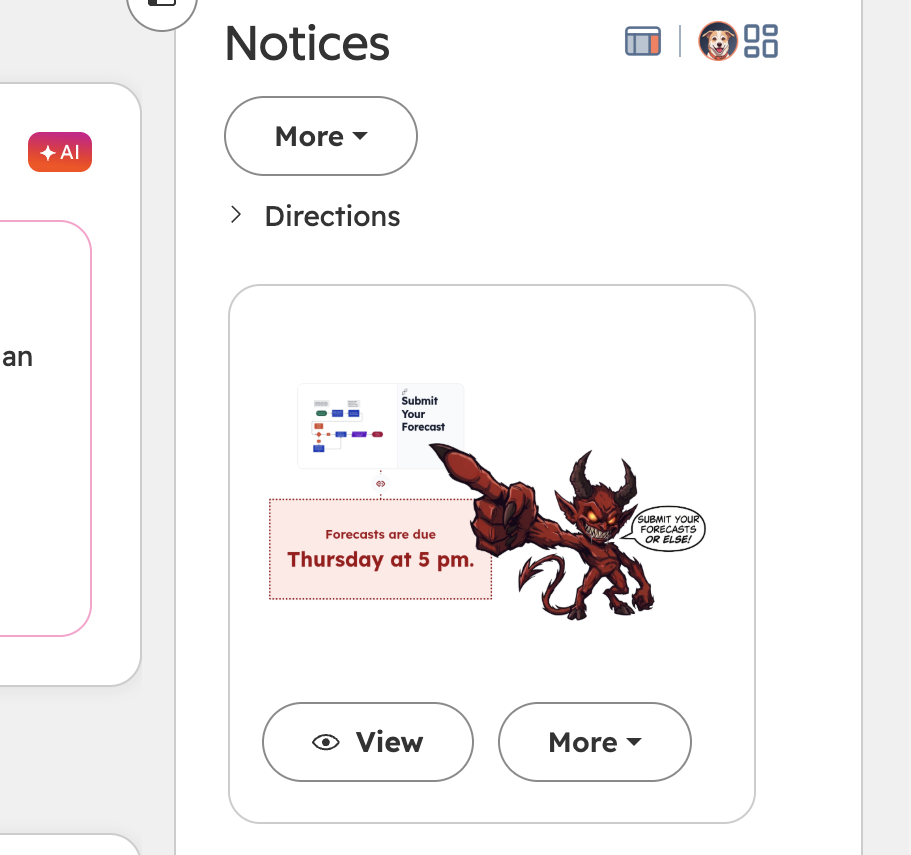
A new launch, a retired product, the line you want every rep using this month. The Bulletin Flow puts one message on every record sales works, where it can't easily be ignored, and links to the Flow with the details.
Nag your teams in the most effective way possible. Put a bulletin they can't easily ignore on every HubSpot record they work.
Your campaign reviews and the meetings you feed
Marketing runs its own recurring meetings, like the weekly campaign review and the monthly funnel report, and feeds many others. A Recurring Meeting Flow maps what each one needs going in, what it decides and what it sends out. A Meeting Prep Flow maps what each person brings, and when it's due. In the example, marketing brings the buyer's voice to a monthly review of lost deals and checks the battlecards against what buyers said.
For each meeting, fully map what information is needed, what decisions need to be made, and what artifacts need to be created and distributed. Link the relevant Flows so they can be easily accessed in each meeting.
Work backwards from your recurring meeting Flows to document what prep work is required from each member, ensuring you have everything you need to run your meetings efficiently & successfully.
New marketers
A new marketer has to learn your tools, your brand and your funnel all at once. The Onboarding Flow maps what every hire does first, then forks by role into each role's own onboarding, which teaches the real Flows they'll work instead of a copy of them.
Define the common onboarding steps for new hires, then branch by team or role to define the specific onboarding steps for each. Give them space in your Flow Pages so everyone can easily find them.
Vacation cover
Campaigns keep sending while their owner is away. The Vacation Flow maps what each role hands over before they go, what their cover does while they're away, and what they take back when they return, so nothing launches, or fails to, by surprise.
Your people go on vacation. It's good for them. Make life easier for those not on vacation by carefully defining what handoffs need to be made per role when your people step away and when they return.
The Onboarding and Vacation examples are written for Hooby Snacks' sales roles. Keep the shape, the common steps first and then a fork by role, and swap in your own marketing roles.