
The Rationale
In the AI era, change is the only constant. We must wrangle it, or else be consumed by endless friction.

This is the "why" behind Hooby Flow's design. Jump back to The Reason for the "why" behind us choosing to build Hooby Flow.

The headings in the On this page section tell the high-level story, click any of them for the details.
Process mapping reduces friction & adds clarity across revenue teams
Foundationally, we think of Hooby Flow as a noun, an adverb, and a verb.
Hooby Flownoun, adverb, verb
Hooby Flow is a platform for process mapping.
The Hooby Flow is the simplified yet enhanced flowchart you edit to map your processes.
The Hooby Flow is also a state of doing. Yes you're making process flowcharts, but you're also wrangling all the actions that keep your revenue engine running into a format that can realistically guide how your teams operate. There is huge potential for collective clarity when you successfully chart the way effort travels through your organization.
But potential requires action. To Hooby Flow is also to iterate. We prefill your Lifecycle & Pipeline Flows with their matching HubSpot stages, but otherwise the map is yours to create.
In our Leadership guide, we offer a people playbook for rolling out Hooby Flow. It provides the iteration plan that takes you from kickoff meeting to live process map, and from live process map to collective clarity.
Our foundational goal with Hooby Flow is to help revenue teams remove friction & add clarity.
Friction at work leads to long hours, burnout, turnover, and inevitable fumbles. From onboarding to exit interview, quarter after quarter, year after year.
Clarity at work leads to happier, more aligned and more effective teams. Teams with clarity can onboard with confidence and support their people taking real, un-interrupted vacations. They can make the right improvements in the face of change. Teams with clarity know the organization's boundaries and how effort flows across them, allowing them to avoid the divisive politics of blame.
To bring to market the solutions our societies need to tackle the ever-expanding challenges of the twenty-first century, our revenue teams need much less friction and much more clarity.
Hooby's objectives are clear
Three objectives set Hooby Flow's direction, each in service to our foundational goal:
The next three sections take them one at a time, along with the choices each one led us to make.
Read on for our detailed strategy, or jump to Starting to Flow to get started with Hooby Flow.
1. Make Hooby Flow easy to adopt
We can't hope to remove friction in your organization if our tool creates lots of friction itself. Following a few tenants, we've prioritized ease of adoption throughout the Hooby experience.
Have your HubSpot users be your Hooby users
You've already committed to HubSpot for its unifying power. You're already enjoying the many benefits you get when your people in sales, marketing, fulfillment and service manage their work together in one tool. Hooby Flow acts as an extension, requiring no new logins for your users.
After Hooby Flow is installed, if you've gotten your people set up to access HubSpot, they're set up to access Hooby Flow.
By default, touch only your HubSpot metadata
Your CRM data is the lifeblood of your revenue organization. You should be rightfully cautious about giving another application access to it. That is why Hooby Flow only requests access to your HubSpot metadata by default. A base install of Hooby Flow can access only what data fields your records hold and how they associate to other records, not the actual data itself.
Hooby Flow is a very effective tool with only this access. As your organization grows to trust Hooby, you can grant more access to enable more integrated features.

Keep your Flows securely in your region
HubSpot is used by organizations across the globe. To match HubSpot's data residency approach, Hooby Flow deploys to data centers in the United States, Canada, Europe and Australia. All your Hooby data is stored and processed in the same region as your HubSpot data.

Reliability and security aren't optional for Hooby Flow. See how we approach both in our Trust Center.
Price for how teams use it
As we describe in our Leadership guide, creating a process map that's accurate yet easy to follow requires curation & collaboration. Too many cooks in a kitchen make for an unbalanced meal.
Hooby Flow is therefore priced to support this balance. You purchase Editor seats for your curators, and those seats bundle Viewer seats for your collaborators.
We support two main categories of Hooby Flow user. The first is revenue departments, who use Hooby Flow to organize their teams. The second is agencies and consultants, who use Hooby Flow as a creative tool for their client work (and also to organize their teams).
We have a plan for both categories:

Make it a worthwhile tool for HubSpot Solutions Partners
Revenue departments employ many talented people, but very few of those people have likely ever built an organization-wide process map.
As we describe in our Leadership guide, organizations can accelerate the journey to their process map v1.0 with the help of an outside expert.
Luckily, HubSpot has done an excellent job growing their HubSpot Solutions Partner program. In it, you can find RevOps experts that know your industry, know the human and automated processes that really work, and can help you get your teams better organized on top of Hooby Flow.

With for our HubSpot Solutions Partners
Daywards is a software company, not a RevOps agency. We're looking for partners who'd like to use Hooby Flow as a creative tool when pitching their RevOps services. We're offering 75% off on Partner Editor seats* as a sweetener.
If you'd like to pitch a Hooby Flow implementation project, we're also offering a 60% off only-for-your-agency discount code* to offer to your clients as a sweetener.
If interested, drop us your info and we'll reach out soon.
2. Make process mapping truly useful for revenue teams
We can't hope to add clarity in your organization with a tool that is difficult to use. Following a few design principles, we've prioritized a combination of features that make process mapping truly useful for modern revenue teams.
Provide the essential syntax in a guided experience
With a generic drawing tool, the job is “draw a diagram.” A process map is just one of many things the canvas can become. You’re handed a blank page with shapes and lines, and the structure of your process is yours to invent from scratch. That starting friction is real.
By contrast, Hooby Flow's core purpose is to help you create process maps that are accurate yet easy to follow (and that also happen to be flowcharts). With this focus, we're able to reduce the syntax down to just the necessary flowchart elements. And on these elements we're able to bake in layers of process mapping intelligence, removing much of the usual diagramming friction from the editing experience while enabling a host of features that make process mapping truly useful.
Support semantic linking between Flows
With just a single canvas in a generic drawing tool, you're limited on how much detail you can show and still keep a flowchart readable. And if you spend the effort to break out into multiple canvases, you're forced to manually reference how they stitch, adding cognitive load for your team when editing and viewing.
With Hooby Flow, linking together multiple Flows into a single, integrated process map is central to the experience.
Processes don’t stop at a pipeline boundary. The end of one almost always starts work in another. Hooby Flow is built so Next/Previous links between Flows are first-class and easy to maintain.
You also can’t strip necessary detail without making the map less accurate — and less useful. With Hooby Flow, you can nest that detail under any step as a Child Flow. Keep each Flow at one clear level of detail for readability, then drill into the children Flows when you need the corresponding detail.
To walk the path together, we must see both the forest and the trees. Jump ahead to Creating Effective Flows to see how these features and some best practices can help you think big and small about your org's operations.
Record the change timeline
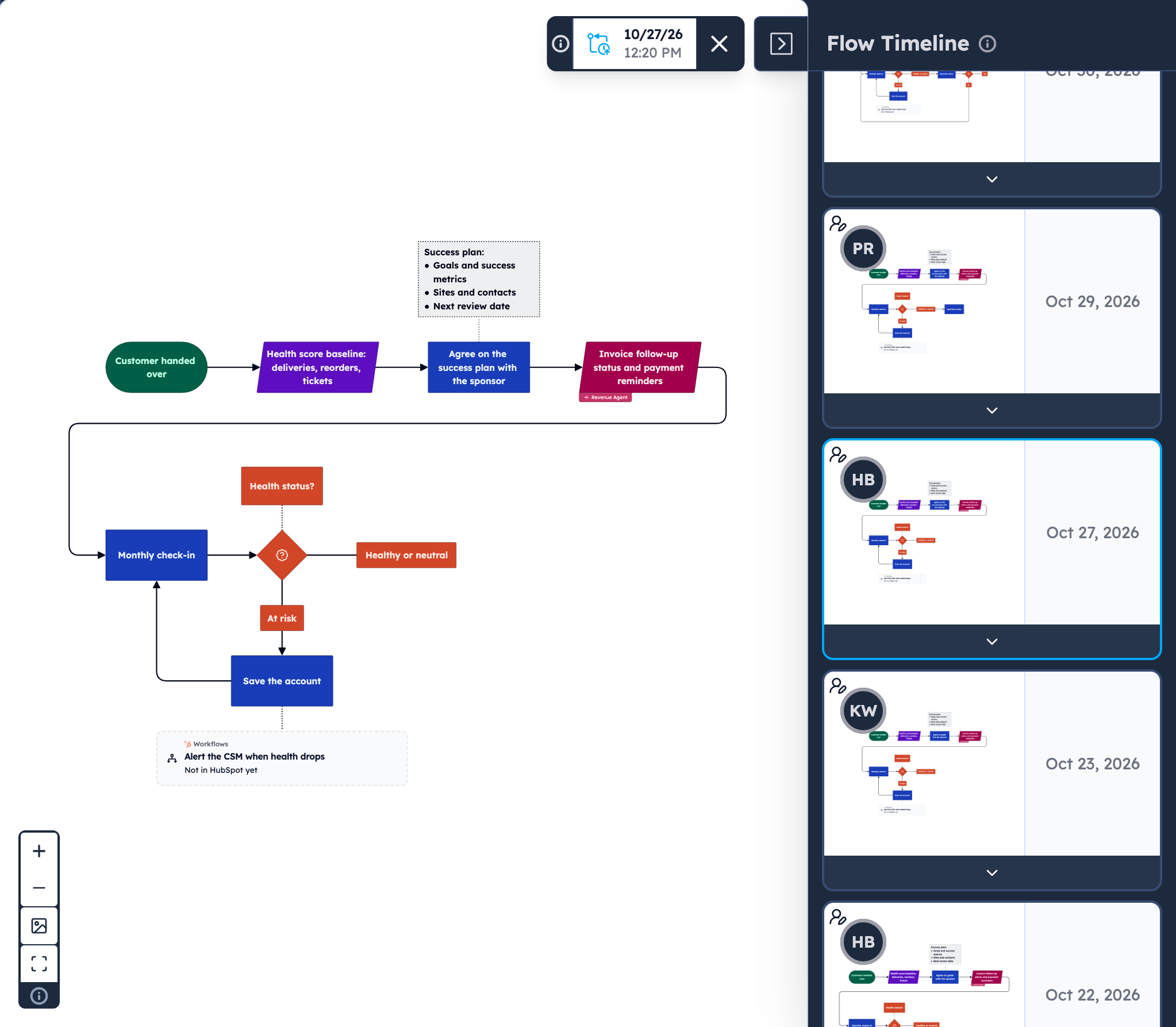
HubSpot's reporting features already give your teams the quantitative picture. What’s harder is answering why results moved — and what to change next.
Your process map is part of that “why”. Hooby Flow records every edit for a Flow, so when results shift you can put the map at any point in time next to the numbers and see which process changes drove the difference.
Support realtime editing
We want your process map to be stupidly easy to pull up & edit when you're discussing process, be it in a one-on-one or an all hands.
With most tools, working on a diagram together means sending a meeting link, sharing a screen, and having one person drive while everyone else calls out changes. That's friction before the conversation even starts.
With Hooby Flow, anyone on your team can open the same Flow and view or edit it together in a shared session, in realtime. No meeting invite required. See something that's changed in practice? Open the Flow, make the change with whoever's involved, and get back to work.
Put your Hooby Flows everywhere your teams need them
A process map only adds clarity if your teams actually see it. For revenue teams running on HubSpot, that means inside HubSpot, right where the work happens.
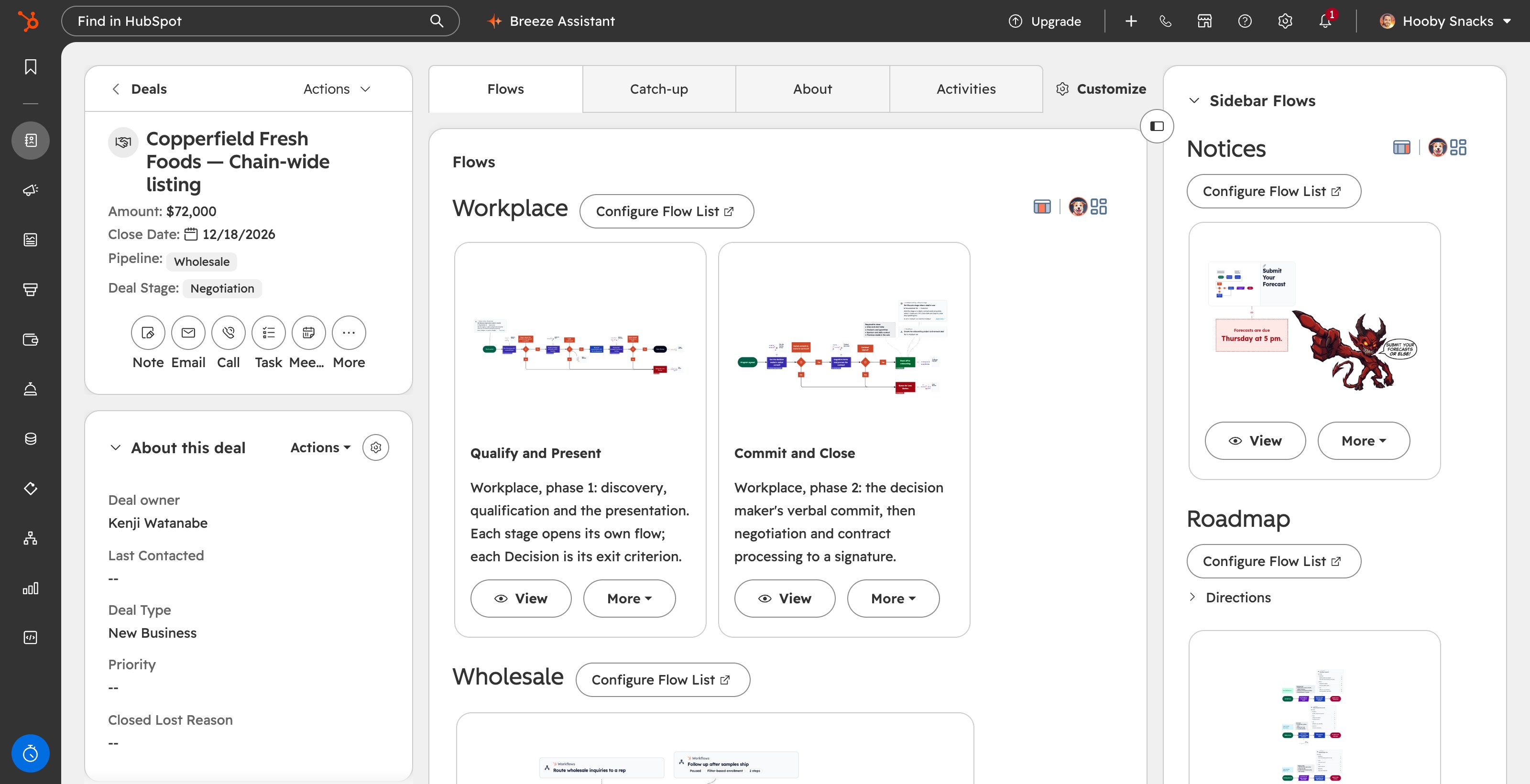
That's why we prioritize the tightest integration with HubSpot that the platform supports. Our Flow Cards are fully configurable on every record type, and easy to organize to fit your org's needs, so the right Flow is always one glance away from the records your teams are working.
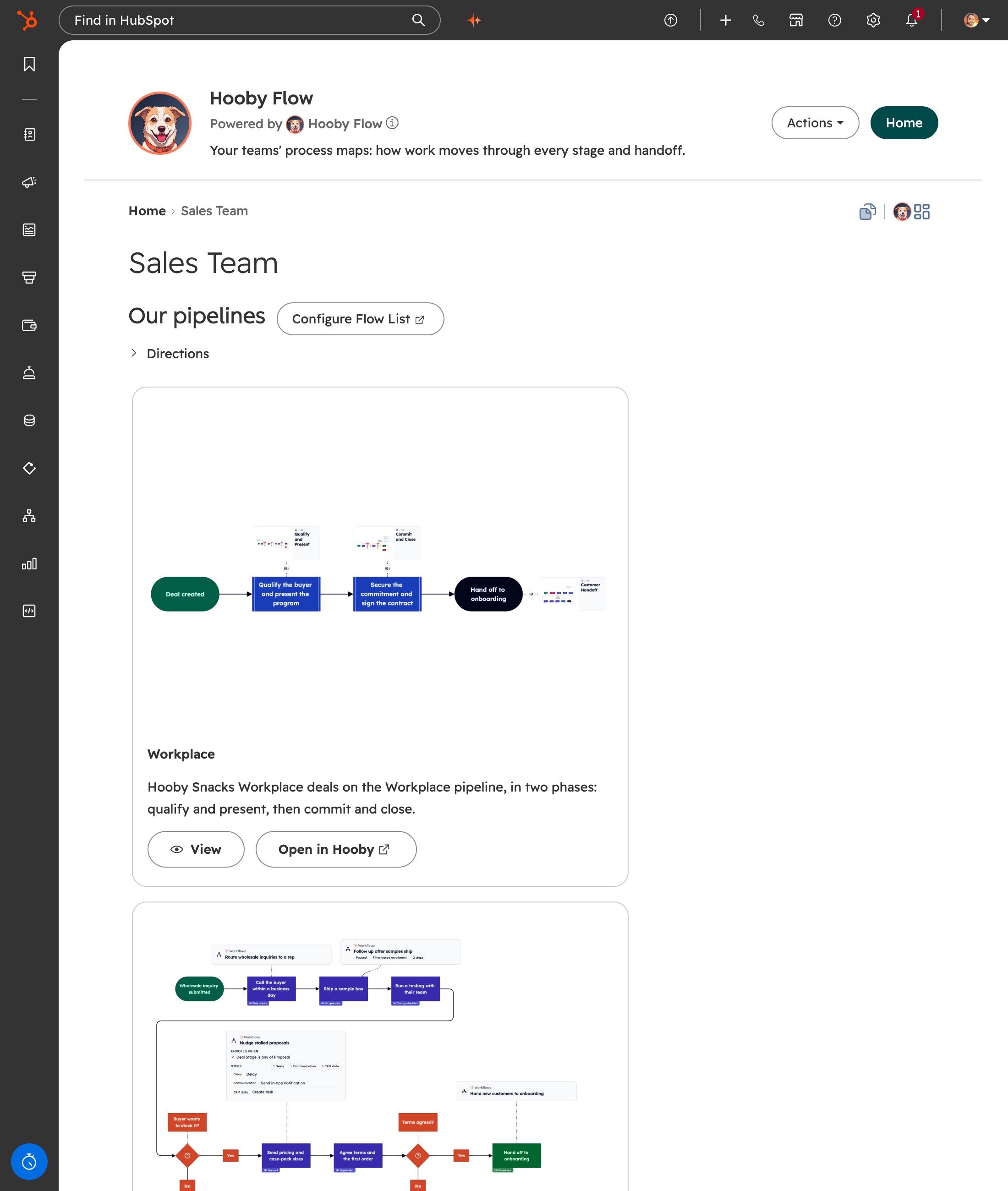
And with Flow Pages, you can organize your Flows on every dimension your teams need, be it by team, by function, by product, or all of the above.
Integrate with your CRM data
A process map says what should happen. Your HubSpot portal is where it actually happens, by hand or on its own. Hooby Flow ties the two together with HubSpot accessories: each element of a Flow can show the parts of HubSpot that carry it out, linked to the real items in your portal so readers can check what they do without leaving the Flow.
- Lifecycle and Pipeline Stage tags show which HubSpot stage a record is in at each Step, so your Lifecycle and Pipeline Flows line up with the stages your teams already report on.
- Workflow cards show the automation that runs at that point, so nobody redoes work HubSpot already does, or builds a second workflow that fights the first.
- Sequence cards show which series of emails and tasks a rep should start.
- Form and Campaign cards show where records come in, and the marketing that brings them.
- Setting cards document HubSpot's built-in settings that move records without a workflow, which are otherwise easy to miss.
Data elements can also show which Breeze agent supplies them. These two Flows are from Hooby Snacks, our fictional snack company. Between them they use every accessory, from a sample box request through to the office pantry deal it opens:
3. Iterate with customers & partners to make the right improvements
Every revenue team maps its processes a little differently, and those processes never stop changing. We're committed to working closely with our customers and the HubSpot Solutions Partners who support them. Together, we'll continue to identify the common patterns that lead to successful process mapping practices within revenue organizations and use what we learn to fine-tune Hooby Flow's tooling.
That work shows up on The Roadmap: what's shipping next, what's in development, and what we're considering. We update it often, and the teams using Hooby Flow today shape much of what's on it.
- The Rationale
- Process mapping reduces friction & adds clarity across revenue teams
- Hooby's objectives are clear
- 1. Make Hooby Flow easy to adopt
- Have your HubSpot users be your Hooby users
- By default, touch only your HubSpot metadata
- Keep your Flows securely in your region
- Price for how teams use it
- Make it a worthwhile tool for HubSpot Solutions Partners
- 2. Make process mapping truly useful for revenue teams
- Provide the essential syntax in a guided experience
- Support semantic linking between Flows
- Record the change timeline
- Support realtime editing
- Put your Hooby Flows everywhere your teams need them
- Integrate with your CRM data
- 3. Iterate with customers & partners to make the right improvements