

Why Hooby Flow?
Getting Started
Guides
Anatomy of a Flow
Viewing Flows
Editing Flows
Flow Cards
Flow Pages
Flow Strategies
Flow Library
Workspace Settings
Troubleshooting
Flow LibraryOn Every Record
The Battlecard Flow
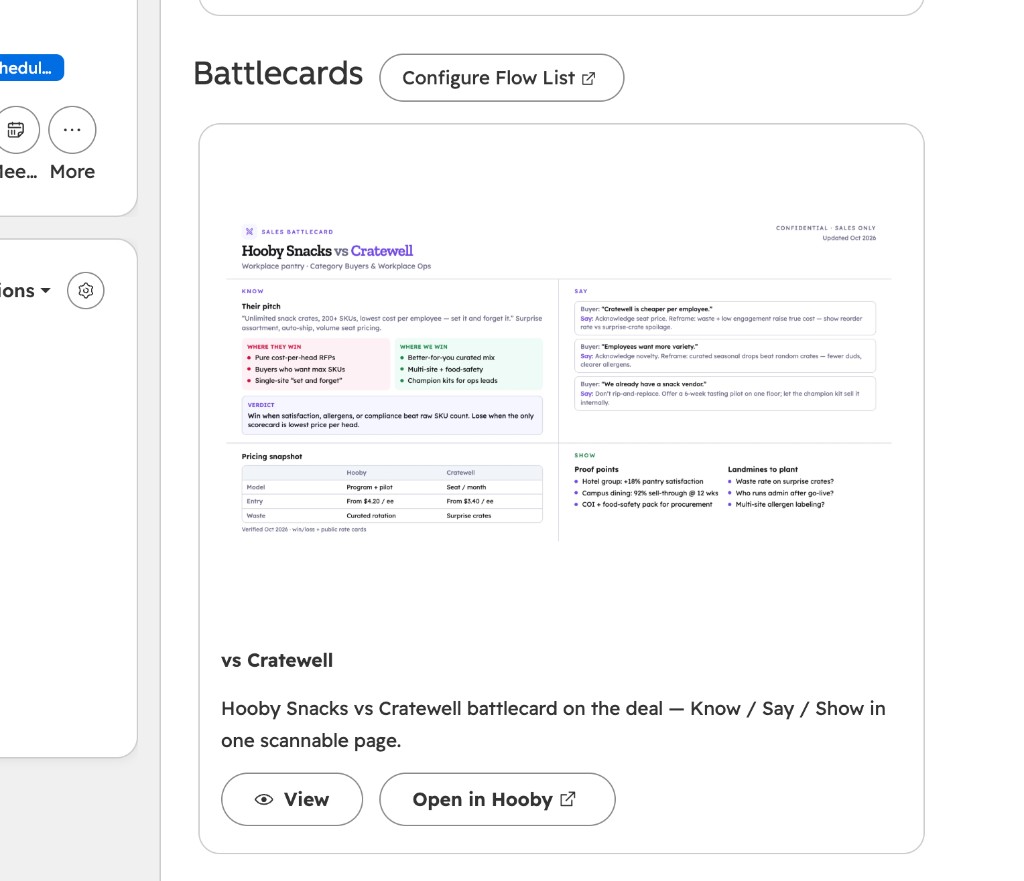
A Battlecard Flow puts each competitor's battlecard on the deal, so a rep has the talk track open the moment a competitor comes up, without leaving the record. The battlecard is the Flow's Image: what to know, what to say and what to show, in one page the rep can scan on a call.
Flow Practices
- One battlecard per competitor. Write one for each competitor your reps hear about on calls, with their pitch, where they win and where you win, the objections and how to answer them, pricing, proof and the landmines to plant.
- Make the image the battlecard. An Image is the whole Flow, so no Steps are needed. Name the Flow for the competitor, like "vs Cratewell", so the right card is easy to find in a list.
- Annotate it with what's new. When a rep learns something on a call, add it as a Context beside the card. The card stays current between redesigns, and the Updated tag shows reps what changed.
- Give each card one owner. One person refreshes it monthly, and within 48 hours when something urgent changes, like a competitor's new pricing.
- Show them large, in their own section. A Battlecards section on the Tab Card, with each card as a large tile with its title and description, gives a battlecard room to be read.
The example: Hooby Snacks' competitors
Hooby Snacks' workplace team meets two rivals on its deals: Cratewell, which sells on price and choice, and Pantrylane. Each has its own battlecard. Copy a Flow to paste into your own portal.
vs Cratewell
vs Pantrylane
Putting them on the Deals Tab Card
Hooby Snacks shows its battlecards on the Deals Tab Card, where there's room for large tiles. To set them up in the Flow Cards Configurator:
- Open the configurator with the Tab button in the Header.
- Choose Deals in the list on the left.
- Add a section from the Section box and name it Battlecards.
- In the right-hand column, open Freeform Flows and add vs Cratewell and vs Pantrylane to the section.
- On each Flow's card in the middle column, set the display style to the large image with title and description.
The battlecards now show on every deal. View opens one in the Flow Navigator, where a rep can zoom in on any part of the card.